
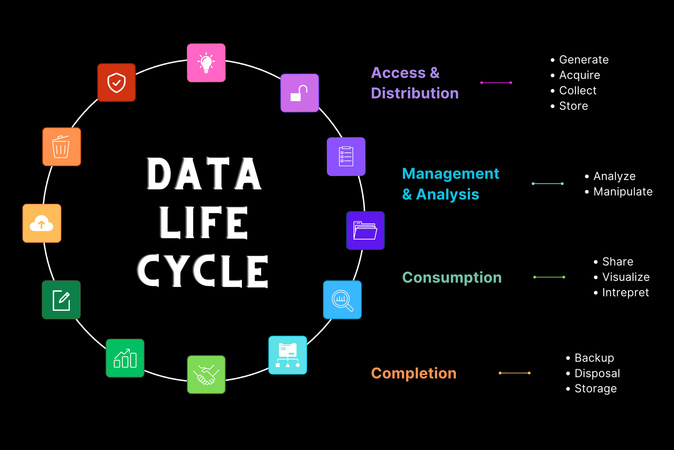
Access & Distribution

Generate
Everything generates data.

Acquire
Not all data that’s generated is collected or used. It’s up to the data governance leaders at our institution to identify what information should be captured, the best means for doing so and what is unnecessary or irrelevant for a project or request.
Collect
Data can be collected in a variety of ways, including forms, surveys, interviews and observation.

Store
After data has been collected and processed, it must be stored for future use through the creation of databases or datasets, most often stored in the cloud, on servers or using some other physical form of storage.
Management & Analysis

Analyze
Processes that attempt to extract meaningful insights from raw data. Analysts and data scientists use different tools and strategies including statistical modeling, algorithms, artificial intelligence, data mining and machine learning to conduct these analyses.
Manipulate
As data is collected, it must be processed and compressed, encrypted or transformed for applicable use.
Consumption

Share
Gaining access or implementing access to track who is using data and what changes they may have made in the process.
Visualize
The process of creating representations of your information, typically through the use of one or more visualization tools. Visualizing data makes it easier to communicate data analysis to a wider audience.
Interpret
Provides the opportunity to make sense of your analysis and visualization for your audience or purpose.
Completion

Backup
After a certain amount of time, data is no longer useful for everyday operations; however, it may be pertinent to maintain copies of the organization’s data. Consider one or more secure methods to store your data for future use.

Disposal
Data that is no longer needed may be deleted to create storage space for new data. Data is removed from archives when it exceeds the required retention period or no longer serves a meaningful purpose.
Storage
When determining data storage, it’s important to consider naming conventions and to build in a certain level of redundancy to ensure that a copy of your data will be protected and accessible, even if the original source becomes corrupted or compromised.